ID: 1894521173 | Updated: Feb 6, 2025

Product Details

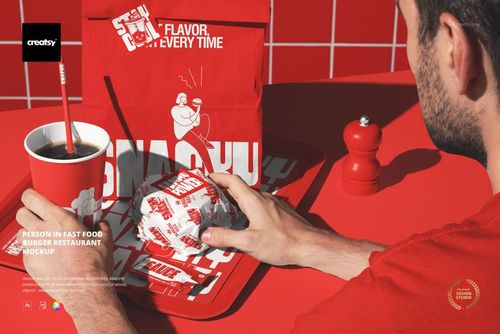
Person at Burger Bar Table Mockup

Bring a restaurant identity to the table with a person in a hoodie seated behind an open burger box. The burger carries a small flag, while a drink stands on a coaster beside the tray. A menu sheet, stickers and sauce sachets add smaller printed details to the table-level view.

What you can edit

  • Hoodie, burger box and flag: change colors and designs.

  • Drink cup and straw: change colors and designs.

  • Menu sheet, stickers and sauce sachets: change colors and artwork.

  • Table: change the color.

  • Wall tiles: change their color; the grout stays white.

  • Retro effect: keep or remove the photo treatment.

Files included

The package contains 1 layered PSD scene and 1 JPG preview. The PSD uses Smart Objects and organized layers, at 4000x6000 px and 300 DPI. Edit it in Adobe Photoshop CC2020 or newer, or Photopea.

Ways to use this scene

Present a burger-bar identity across clothing, meal packaging and table details. The scene suits a restaurant branding case study, menu-launch concept or packaging presentation showing how a main graphic works beside smaller marks and promotional information.

Sample artwork by Vladimir Vashchenko.

Digital mockup files only. No physical products are included. The sample artwork shown in the previews is not included; add your own designs.

File details

Compatibility
PhotopeaAdobe Photoshop
Package size
355 MB355 MB|372 MB372 MB
Files type
.psd, .jpg
Files size
4000x6000
FREE MOCKUPS

Made with Creatsy

Real designs. Real customers. See how creatives use Creatsy mockups to turn their artwork, branding, and product ideas into polished visuals.

MEET THE SHOP

Creatsy logo

Creatsy

Poland
4.8 (714)

Bring your ideas to life.

We're a family-run studio in Katowice, Poland, making PSD mockups by hand since 2016. Everything in this shop starts in our own studio. We shoot the photography, build the 3D, and put together every Smart Object PSD ourselves - then we test it, organize the layers, and only ship it once it actually works...
GO TO SHOP

HOW IT WORKS

3 clicks. That's it.

No tutorial needed. If you can copy-paste, you can use this.

  1. 1OpenDouble-click the smart object inside the PSD - in Adobe Photoshop, or free in your browser with Photopea.
  2. 2PasteDrop in your pattern, print, or artwork. Any design, any style.
  3. 3SaveHit save and the mockup wraps it in for you - shadows, folds, and lighting included.

FROM IDEA TO IMAGE

Built for real workflows

Skip the photo shoot Show your artwork on the real product type for approvals or listings - no studio, no model, no sample.

See it on the product, not a swatch Drop your file into the smart object and the scene's lighting and folds wrap around it, so you judge the real thing before you commit.

Smart Objects

Edit once and you're done. Your artwork drops into a smart object and the mockup updates itself - no masking, no warping by hand.

Perfectly Organized

Named layers and folders you can actually navigate. Find what you need, change what you want, and get out fast.

Print-Ready

High-resolution files built to hold up on screen and in print. Exact size and DPI are in this product's Details above.