ID: 1687445845 | Updated: Nov 9, 2023

Product Details

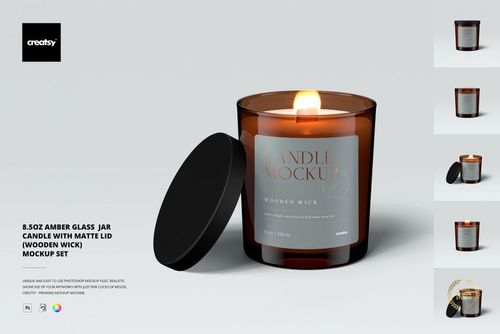
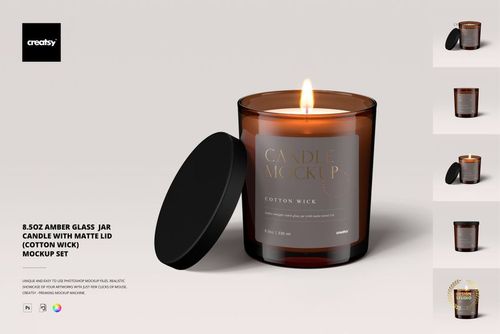
Amber Jar Candle Mockup Set

Build a candle label presentation around the warm tone of amber glass. Five PSD scenes cover open and closed jars, two lid positions, a candle without a lid beside it, and a three-jar composition for showing a coordinated fragrance range.

What is included

  • 5 editable PSD mockup scenes with organised layers.

  • 5 JPG previews and 1 PDF user manual.

What you can customise

  • Replace the paper label design and colour with Smart Objects.

  • Customise label shape and size, with an optional metallic foil effect.

  • Change the lid colour.

  • Hide the flame for an unlit presentation.

  • Change the background colour or insert a texture; objects and drop shadows are on separate layers.

Use the set for candle brand proposals, packaging portfolios, scent-range presentations and shop visuals.

Digital download only. Physical candles, packaging and sample artwork are not included.

File details

Compatibility
PhotopeaAdobe Photoshop
Package size
184 MB184 MB|192 MB192 MB
Files type
.psd, .jpg, .pdf
Files size
6000x4000
TEST FOR FREE

Reviews

Professional PSD mockups built in-house - editable, realistic, high-resolution, and supported by real people.

5 (1 rating)
Sort by:

laura__holmes avatar
laura__holmes
Sep 22, 2023

This is one of the best mockups that I have purchased! Everything is customizable to fit within your brand and it looks super realistic. You need a little bit of Photoshop knowledge, but is pretty self explanatory once you open the files. The customer service is also amazing. I had a few questions before purchasing and received a reply within minutes. LOVE IT!

Malgorzata Hapon avatar
Malgorzata Hapon Author
Jun 8, 2026

Thank you so much for your wonderful review! We’re thrilled to hear you found the mockup realistic, customizable, and easy to work with. Your kind words about our customer service mean a lot to us too. We truly appreciate your support.


MEET THE SHOP

Creatsy logo

Creatsy

Poland
4.8 (703)

Bring your ideas to life.

We're a family-run studio in Katowice, Poland, making PSD mockups by hand since 2016. Everything in this shop starts in our own studio. We shoot the photography, build the 3D, and put together every Smart Object PSD ourselves - then we test it, organize the layers, and only ship it once it actually works...
GO TO SHOP

HOW IT WORKS

3 clicks. That's it.

No tutorial needed. If you can copy-paste, you can use this.

  1. 1OpenDouble-click the smart object inside the PSD - in Adobe Photoshop, or free in your browser with Photopea.
  2. 2PasteDrop in your pattern, print, or artwork. Any design, any style.
  3. 3SaveHit save and the mockup wraps it in for you - shadows, folds, and lighting included.
FROM IDEA TO IMAGE

Built for real workflows

Skip the photo shoot Show your artwork on the real product type for approvals or listings - no studio, no model, no sample.

See it on the product, not a swatch Drop your file into the smart object and the scene's lighting and folds wrap around it, so you judge the real thing before you commit.

Smart Objects

Edit once and you're done. Your artwork drops into a smart object and the mockup updates itself - no masking, no warping by hand.

Perfectly Organized

Named layers and folders you can actually navigate. Find what you need, change what you want, and get out fast.

Print-Ready

High-resolution files built to hold up on screen and in print. Exact size and DPI are in this product's Details above.